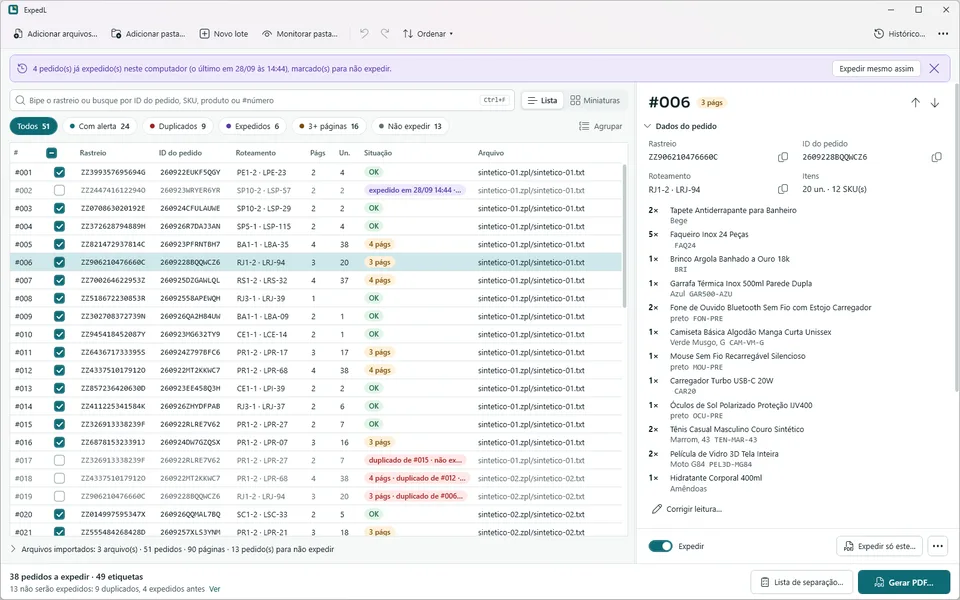
I asked a friend, in person, if there was anything at work he wished software would take care of. He works at a company that sells on Shopee, the online marketplace, and part of his job is printing the shipping labels. He told me about the labels coming out misaligned.
Every Shopee order prints as two pages: the shipping label and a loading checklist with the items. The printer is set to "2 pages per sheet", so each sheet, a single 4×6 thermal label, carries one whole order: label and checklist together. That works as long as every order has exactly two pages.
When an order has a lot of items, the checklist spills onto a third page. The example he gave me was a 101-page print with one order on pages 89 to 91. From page 92 on, every shipping label came out stuck to the checklist of the order before it:
Before: one order has 3 pages

sheet 45 | p.89  label A          | p.90  checklist A   |
sheet 46 | p.91  checklist A (2)  | p.92  label B       |  <- B starts in the wrong half
sheet 47 | p.93  checklist B      | p.94  label C       |
...and every sheet after this one is off by a page

After: a blank page right after the odd order

sheet 45 | p.89  label A          | p.90  checklist A   |
sheet 46 | p.91  checklist A (2)  | p.92  (blank)       |
sheet 47 | p.93  label B          | p.94  checklist B   |
The fix fits in one sentence: if an order has an odd number of pages, add a blank page after it. Doing that by hand meant printing in parts, working out the breaks yourself and hoping you didn't print an order twice.
I didn't know what a ZPL file was
The hardest part of the whole project was understanding the problem. Looking back, it's simple. At the time, without knowing his job, his first explanation sounded like a lot of moving parts, and I asked questions until I could see what actually had to happen.
I had also never heard of ZPL. It's the language of Zebra label printers, and it's what Shopee gives you when you download labels. I had to go read about it before I could plan anything.
What I learned about the workflow: download the ZPL files from Shopee, around 300 a day, convert them to PDF on a free website with no preview and no editing, then print from the browser. Besides the misalignment, two things bothered me. The free site receives every buyer's name, address, ZIP code and products. And nothing stops the same order from being printed twice.
Friday: writing it down first
On Friday, September 25, I spent the day writing a spec: context, constraints, phases and acceptance criteria. The free site costs nothing, so price was never going to be the argument. The argument is data safety, time, fewer human errors and less paper, and I wrote that every product decision had to serve those four.
The constraints: 100% offline, no telemetry, compliance with the LGPD (Brazil's data protection law), no admin rights to install or run, only permissively licensed dependencies (MIT, Apache, BSD, OFL), Windows 10 and 11, and a Portuguese interface.
The alignment rule became an invariant. Every order takes an even number of pages, so every shipping label lands on an odd page. The acceptance test was my friend's case: the 101-page print becomes 102 pages, with the blank on page 92 and the next label on 93.
My first guess at a stack went into the spec as a guess: .NET 8, WPF or WinUI 3, a library called BinaryKits.Zpl.Viewer to render the ZPL and PDFsharp to write the PDF. Each choice was there to be confirmed or thrown out. Before any product work there was a step zero, a fidelity spike: if the barcodes and QR codes in my output couldn't be decoded, I'd stop there.
I also decided how I'd work: plan first, architecture and milestones before code, one milestone at a time with small commits, and nothing from a later phase until the current one was done. Every decision that changed the spec became a row in a table, with the reason next to it.
Saturday: Shopee doesn't send what I thought
The spike was the first commit, at 3:22 pm on Saturday. The spec assumed ZPL full of text. Each page turned out to be one black-and-white bitmap, 816×1218 dots (4×6 inches at 203 dpi), compressed inside the ZPL. There's no text at all. Name, address, order ID and products are all pixels.
This is what a page looks like, minus the image data:
~DGR:<name>.GRF,124236,102,:Z64:<base64 of zlib data>:<crc16>
^XA^MMT,Y^PON^MNY^FO0,0^XGR:<name>.GRF,1,1^FS^PQ1,0,0,N^XZ
^XA^IDR:<name>.GRF^FS^XZ
The first line loads the image into the printer's memory, the second prints it and the third deletes it. Everything on the label is that one picture:
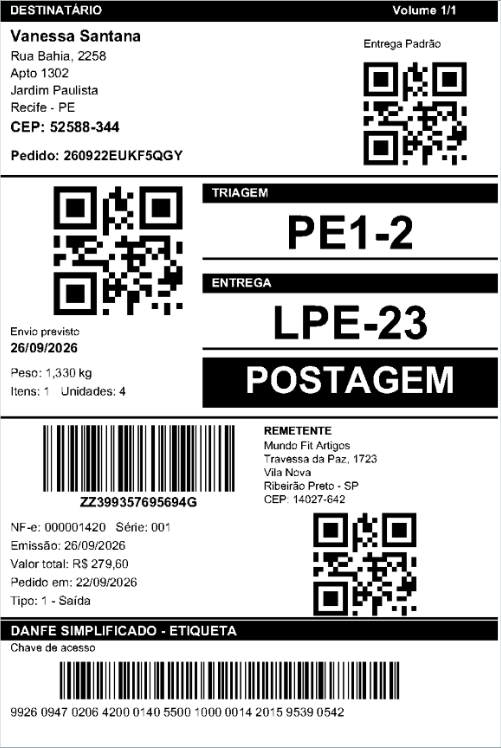
That changed most of the plan:
- No ZPL rendering library. Shopee's files have nothing for it to render. A small interpreter of my own, with a closed list of ZPL commands, is exact by construction, and any command outside the list rejects the file instead of producing a wrong label in silence.
- No PDFsharp. The version I tested wrote compressed streams without the zlib ending (
qpdf --checkcomplained), turned on image interpolation and put random IDs in the metadata, so the same input never gave the same PDF. The PDF I needed was only 1-bit images, so it became a small writer using the standard library. - .NET 10 LTS instead of .NET 8, because .NET 8 support ends in November 2026.
- WPF instead of WinUI 3: mature, publishes as a single executable without MSIX and runs on Windows 10.
- The tracking code, read from the barcode, became the key of each order (duplicates, history, search), because the order ID only exists as an image.
The spike also found a problem in the old flow. The free site places the same bitmap on a 100×150 mm page, which shrinks it to about 98%. That's enough to break the 44-digit barcode of the NF-e key (the electronic invoice number every Brazilian shipment carries):
| Free site's PDF | ExpedL's PDF | |
|---|---|---|
| Page | 100×150 mm, image at ~98% | 4×6 in, image at 1:1 |
| NF-e barcode readable | 0 of 50 | 50 of 50 |
| All codes read at 203, 300 and 600 dpi | 200 of 250 | 250 of 250 |
Real data never went into the repository. The spec asked for a tool to anonymize the text in ZPL files, but there was no text to anonymize, so that tool became a generator of synthetic pages in the same format. Every test page is marked SINTETICO, and a test fails if the mark is missing.
Saturday night: aligning is easy, printing isn't
The alignment is a pure function that only sees page numbers. The "every label on an odd page" invariant is tested across 500 combinations, and the PDF writer refuses a page sequence that breaks it.
To align, the app has to know which page is a label. A page counts as a label if its tracking barcode is readable or if more than 15% of it is ink. In my tests, labels sat between 0.246 and 0.266 ink and checklists between 0.011 and 0.073. When the two checks disagree, the app inserts no blanks and shows a warning instead of guessing.
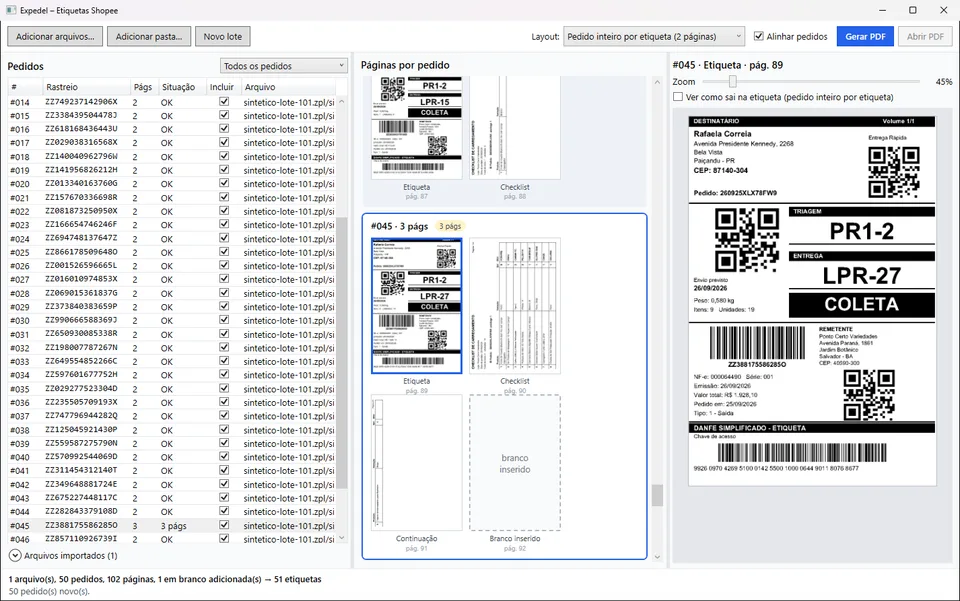
The first screen was up at 7:20 pm. In a synthetic 101-page batch, order #045 has three pages on 89 to 91, and the app puts the blank on page 92, like in my friend's example:
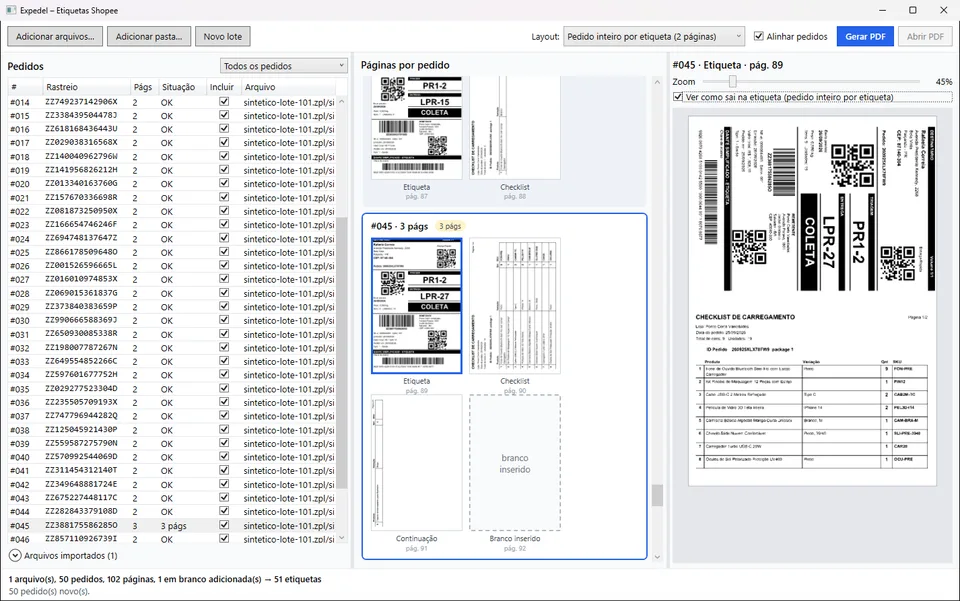
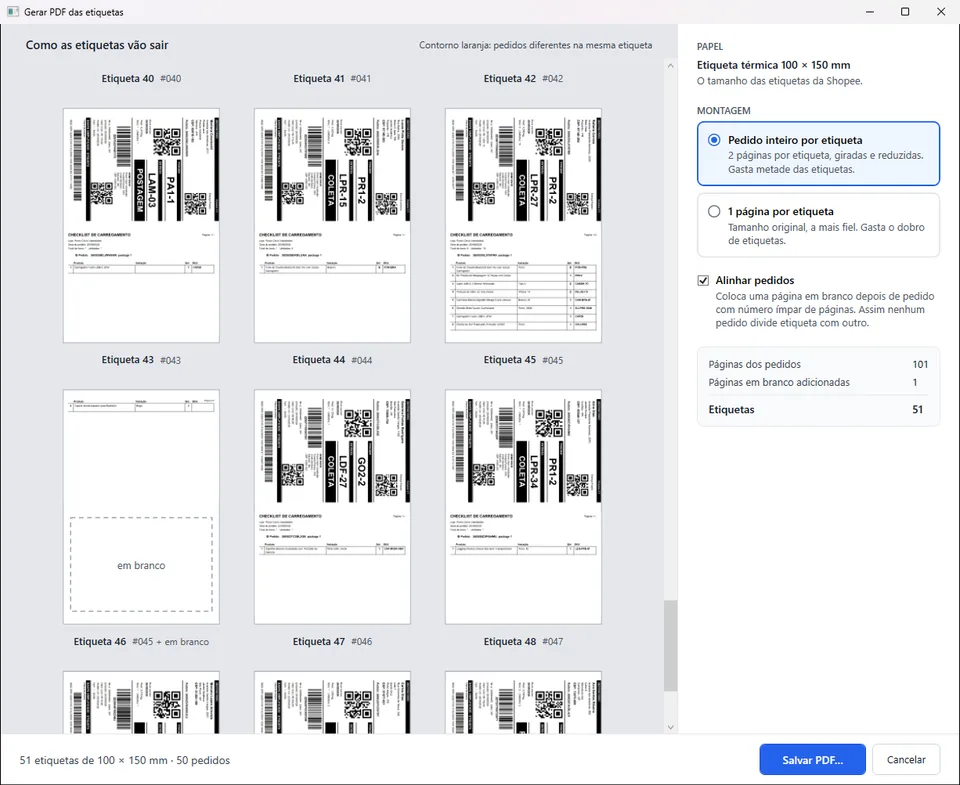
The printing was the bigger surprise. The spec had A4 layouts in it. Asking more questions showed there was no A4 anywhere: only 4×6 thermal labels, printed from the browser with "2 pages per sheet" at 100%, the browser rotating both pages and shrinking them to 2/3. So the app took that job over. It builds each 4×6 label itself, with the whole order on it, and whoever prints just sends it at 100%, one per sheet, with nothing to configure. The same screen got a checkbox to preview that:
That created a new problem with the barcodes. Shrinking a barcode to 2/3 on a 203 dpi printer doesn't work: a bar 2 dots wide becomes 1.33 dots, and the printer can only print 1 or 2. On the bench, 0 of 30 Code 128 barcodes could be read after the reduction. The way out was to rebuild each Code 128 pattern from the barcode's structure and redraw it with whole-dot bars. The content doesn't change, only the bar widths. With that, the NF-e barcode stays readable on the assembled label, which never happened in the old browser flow either.
By 10:20 pm there was a Generate PDF window that previews every label before saving. Same batch, first with alignment off:
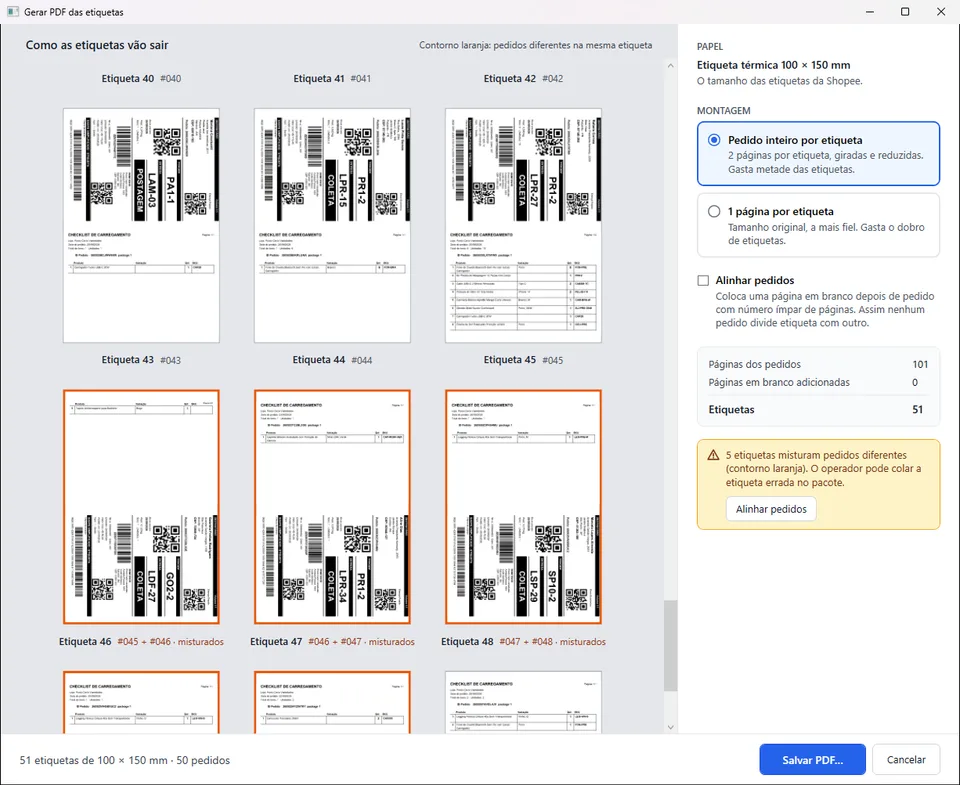
And with it on:
By then the first version could read files safely with size limits, group pages into orders, align, write the PDF and show it all in a WPF window. With 300 files (600 pages), the table was complete about 1.35 s after the window opened, and the window answered in under 30 ms while it worked. The 102-page PDF took 11 ms. Before the night was over I added a history of orders already printed (encrypted with DPAPI, kept for 90 days), search and reprint of a single order, and batch editing with drag, remove, manual blanks and undo, with the alignment redone after every edit.
Sunday morning: reading what's only pixels
Sorting by product, a picking list and search by SKU all need text, and there was none. So, before any feature that depended on it, another spike: OCR. I weighed Tesseract against the OCR engine that ships with Windows. Windows OCR found the same order ID on the checklist as on the label in 50 of 50 orders, at about 95 ms per page, offline and with no new dependency. Tesseract would have added native DLLs and around 20 MB. Windows won. It's called through a COM bridge written by hand, because the official package to reach it didn't have a permissive license.
The routing codes were a small puzzle. A label has two black boxes with codes, and Shopee doesn't document them. Measuring 50 labels showed the top box is the sorting center and the bottom one is the delivery hub (L, the state, a number, like PR1-2 · LPR-18). The app now reads each box by its position and fixes the usual OCR confusions (0 and O, 1 and I) using the format each box can have. That fixed all 10 misreads in my test set.
By Sunday afternoon the table had order ID and routing columns, the search box took a tracking code, order ID, SKU or product, and the side panel listed the items read from the checklist:
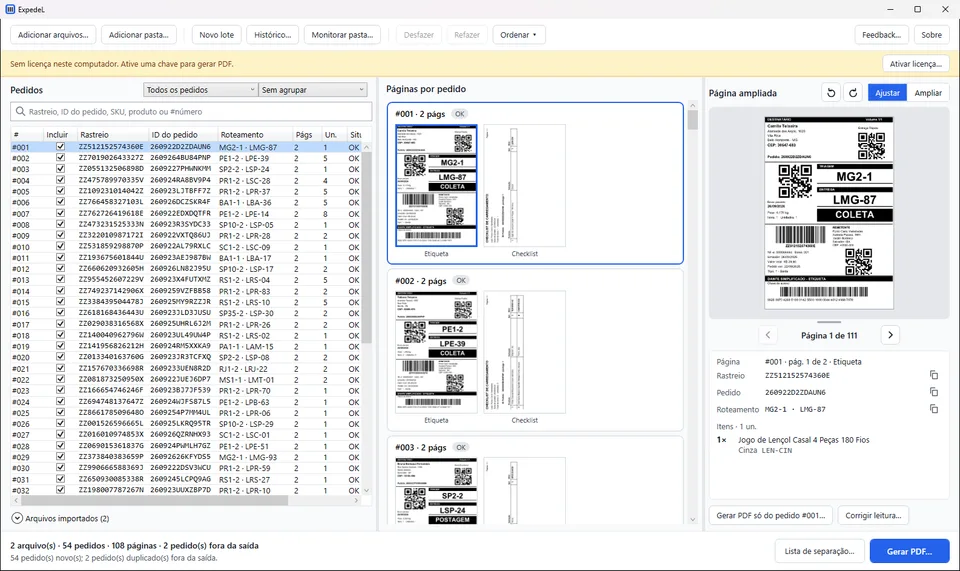
The picking list sums the items of the whole batch by SKU, so whoever separates the products can grab everything at once. It only adds up readings that are identical, and marks the near-identical ones with "check". A shirt in "BLUE S" and one in "BLUE M" are one letter apart and are different sizes. Seeing two lines for the same product is annoying; picking the wrong size is worse.
OCR also made the app worse for a while. Peak memory went from about 510 MB to 1.1 GB, and the window froze for up to 1.7 s. OCR started at the same moment the list was being drawn, allocated about 5 MB per page on 6 threads, and the garbage collector kept stopping the UI thread. After reusing buffers, capping OCR at 4 threads and waiting for the window to go idle before starting, the peak was about 685 MB and the longest pause about 0.7 s.
Sunday afternoon: learning how to sell software
I had never sold software before, so this part was research. I had to decide what a license would look like for an app that never goes online, and what the law asks of me before a stranger can install it.
The license I landed on is paid once, lifetime, with a year of updates, and tied to one computer. Importing and checking a batch are free, so anyone can see what it does. Generating the PDF needs a key. My first attempt had an automatic 15-day trial, but clearing two local markers gave you another 15 days. Issuing a key by hand costs me very little, so I replaced it with trial keys that I send myself, with an expiry date.
I left code signing out for now. A certificate costs money and there are no customers yet, so whoever downloads the app sees a Windows SmartScreen warning once per version.
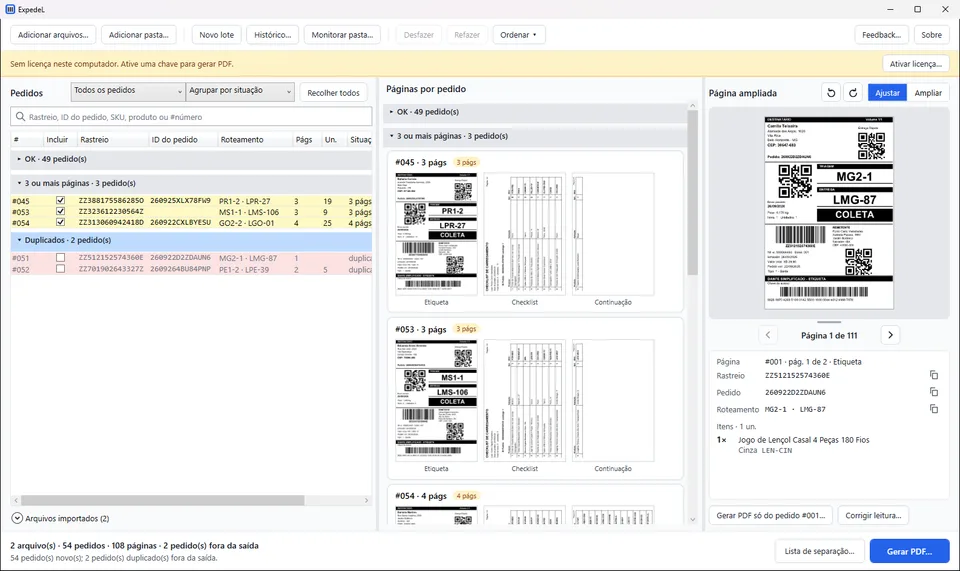
Then I wrote my own list of 15 improvements, things I thought would make the app more useful day to day. One stopped a real risk: generating the PDF twice in the same session used to print everything twice without a warning, and now each order is marked as shipped as soon as its PDF is saved. Another restores the batch after a crash without writing any label to disk. Others were about finding things in a big batch: grouping the list by file or by status, and fixing an OCR reading by hand. Grouped by status, the orders with three or more pages and the duplicates get their own groups:
Sunday evening: redoing the interface
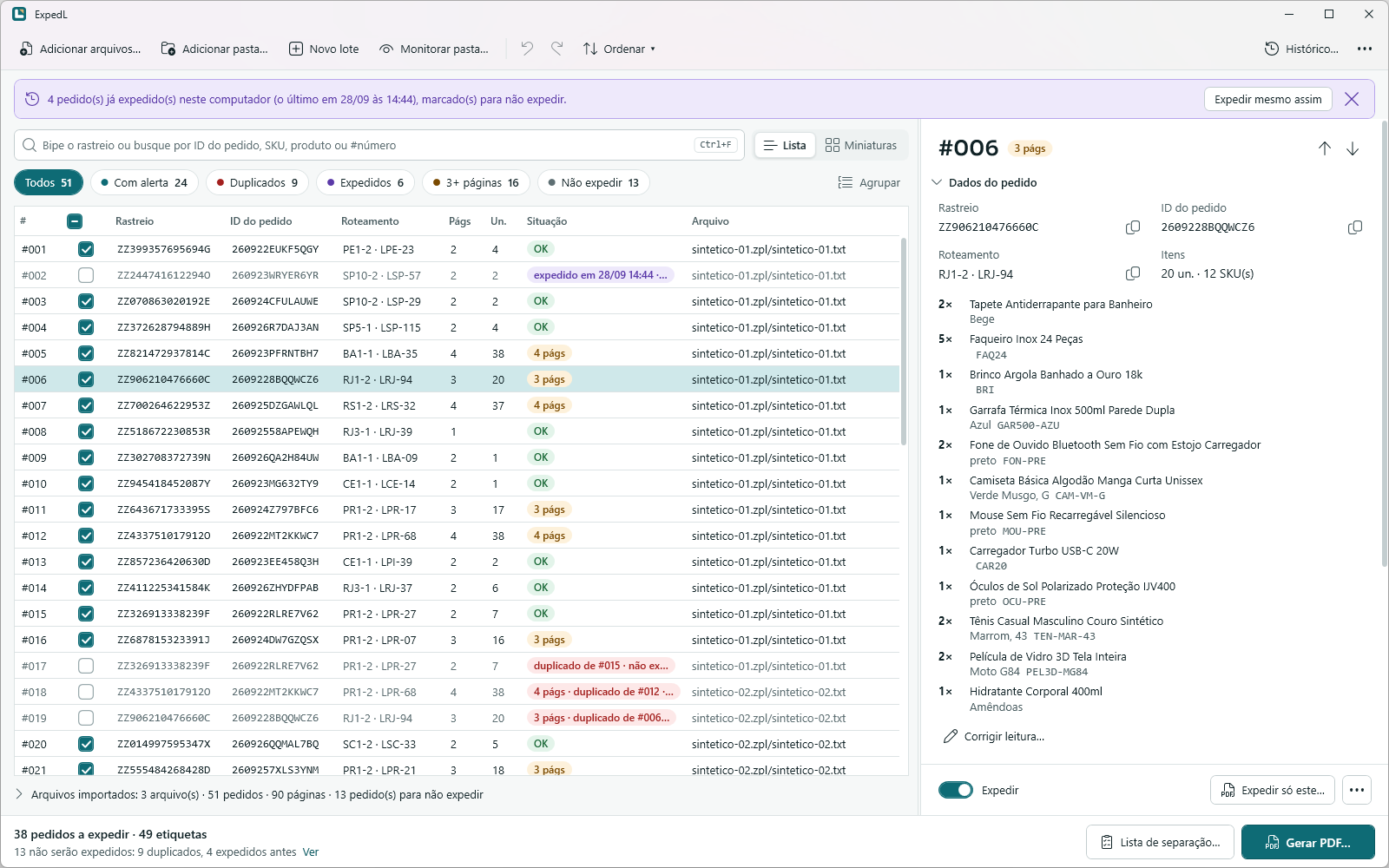
The last two screenshots are how the main window looked at the end of Sunday afternoon. It showed the same batch three times, as a table, as cards and as an enlarged page, each with its own scroll. The redesign turned it into a list plus an inspector for the selected order, and the batch counts became filters you can click: orders with alerts, duplicates, already shipped, three or more pages. There's a brand now (a white L that stands for the whole order, with a kraft-colored tab in the corner, on a petrol-blue background), the Sora font for titles, colors by role and a dark theme.
The words changed too. The UI is in Portuguese, and statuses like "already out" read oddly, so an order is now simply "expedido", shipped. The name comes from the same word: "Exped" from expedir, to dispatch, which also reads in English, plus the L from ZPL and from the logo.
Monday: shipping 1.0.0
Monday was about turning a project into something other people can download. The legal part went in: Terms of Use and a Privacy Policy, accepted on first launch. The synthetic generator learned to draw real text with a small font rasterizer, so the OCR had something to read in the tests. With Sora it confused 1, l and I. With Windows' Arial, the readings were on par with the real labels.
CI on GitHub Actions now runs on a clean Windows machine for every pull request: restore with locked versions, build, test, publish. The code repository is private, so each release is copied to a public repository that only holds downloads, with a changelog written for the people who use the app. CI rejects a version without one.
Version 1.0.0 went out at 5:07 pm on Monday, September 28: a single 62 MB executable with .NET inside, for Windows 10 and 11. Counting from the first commit on Saturday afternoon, that's about two days. By then there were 482 automated tests, 74 recorded decisions and around 25,000 lines of C# and XAML across the app, the tests and the tools.
Not tested yet
So far it hasn't been tested for real. No label from the app has gone through a thermal printer or a barcode scanner, and it hasn't been used on a real day of shipping. All the readability numbers above are digital, and a digital reader is more forgiving than a physical one. My friend has seen it working and confirmed it solves his problem.
There are smaller gaps too. The OCR needs Windows' Portuguese OCR language, which a clean install doesn't have. Without it, order ID, routing, items, sorting, the picking list and SKU search are unavailable, while importing, checking and generating the PDF still work. The executable isn't signed. And nobody has bought it yet.
What's next
These are plans, each with what it depends on:
- Print on a real thermal printer and scan the labels. That unblocks bigger text for the items on the checklist (the one thing my friend asked for besides the alignment), a check on the quality of the assembled label, and layouts for other paper sizes.
- Show the recipient's name and address in the order panel. The OCR doesn't read that block yet, and there's an LGPD decision to make before it does.
- Other marketplaces. I've mapped out three levels (accept any label generically, use the first barcode as the order key, or a dedicated profile per marketplace), but nothing starts without real sample files. My assumption about Shopee's format was already wrong once.
- Sign the executable once there are customers.
What I'm taking from it
I used Claude Code as an assistant along the way, and the project went smoothly. What I got better at was project management, software architecture and writing prompts.
If you sell on Shopee and print labels on a 4×6 thermal printer, you can download ExpedL for Windows (all versions are on the product page). To try it, email me at contact@gabreusi.dev for a trial key.